

 IV

Upsells and Rebills
Track extra sales on the same click and decide what your traffic source hears about.
This page shows you how to track more than one sale from the same visitor, such as an order bump or a monthly renewal, without inflating your conversion count or confusing your traffic source.
Every extra sale is its own postback with the same click ID. The postback's kind says what it is:
kind | What it is | Conversions | Revenue | CPA charge | Offer cap |
|---|---|---|---|---|---|
primary | The first sale on the click. The default. | Counted | Added | Yes, on a CPA campaign | Used |
upsell | An extra purchase in the same session | Not counted | Added | No | Not used |
rebill | A later charge, such as a renewal | Not counted | Added | No | Not used |
So Conversions tells you how many customers you bought, and Revenue tells you everything those customers paid.
Give each sale its own tid
Without a tid, Proferex records only one conversion of each kind per click. A second upsell or the second month's rebill would be ignored as a repeat.
Map your offer source's transaction ID to tid, and each sale is recorded once:
https://track.mydomain.com/u/YOUR-ALIAS?clickid={aff_sub}&payout={payout}&tid={transaction_id}&kind={kind}If your offer source has no macro for the kind of sale, set up a separate postback for upsells or rebills at the offer source, with kind=upsell or kind=rebill written in.
Choose what your traffic source hears about
Proferex passes your conversions on to the traffic source the visitor came from, so you can optimize inside the traffic source. Most push, pop, and native traffic sources count every postback they receive as a new conversion. An upsell sent to them looks like a second customer, and the traffic source's own CPA and conversion rate become wrong.
Each traffic source has an Upsells and rebills setting that decides which conversions it hears about. Open the traffic source in Tracker → Traffic Sources. The setting is under the Postback URL.
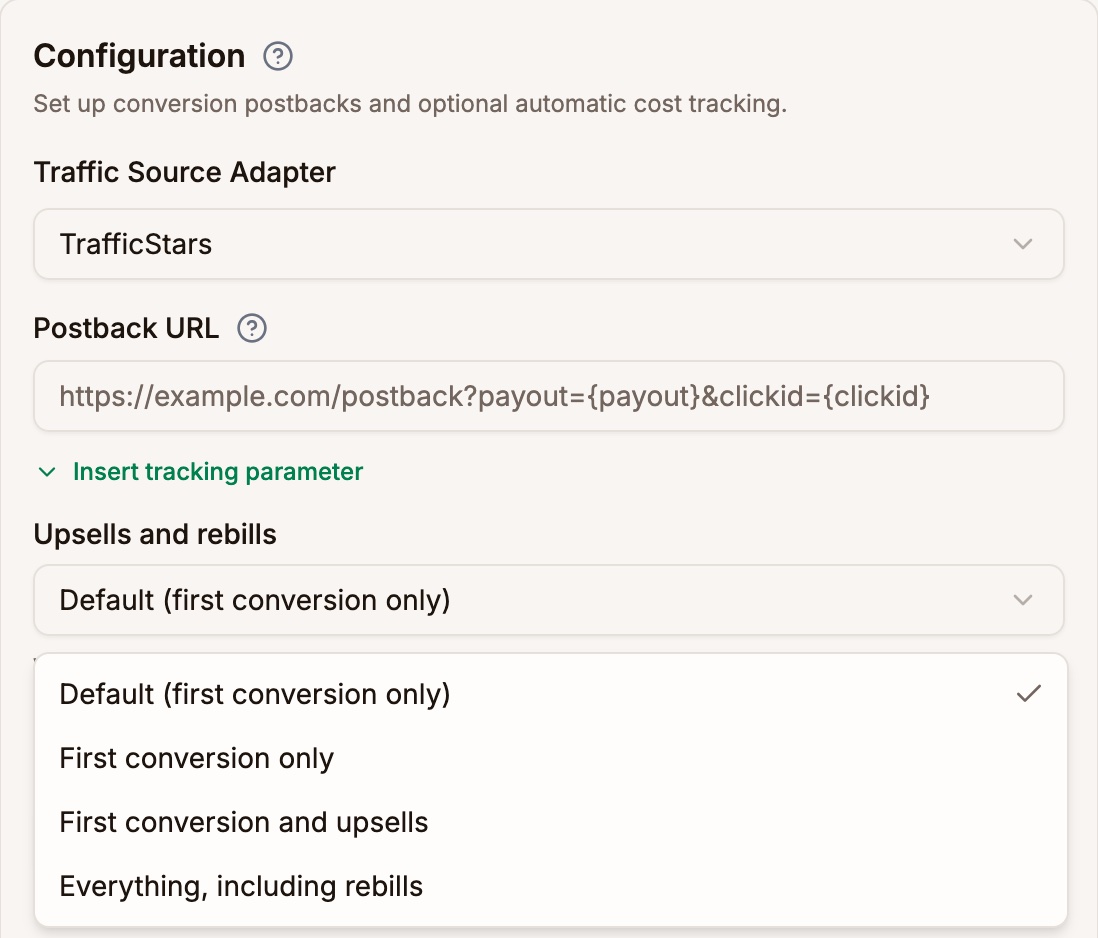
| Option | The traffic source receives |
|---|---|
| First conversion only | Only the first conversion on each click |
| First conversion and upsells | The first conversion and its upsells, but no rebills |
| Everything, including rebills | Every conversion |
Default is First conversion only for TrafficJunky, TrafficStars, ExoClick, and your own traffic sources. Keep it unless your traffic source optimizes on conversion value and expects every sale.
Rebills arrive days or weeks after the visit. Sending them to a traffic source makes old placements look like they just converted, so leave them out unless the traffic source asks for them.
The setting only changes what the traffic source receives. Your Proferex reports always include every conversion.
Send and count
Two postback parameters override the rules for one conversion:
send=1sends this conversion to the traffic source, whatever its Upsells and rebills setting says.send=0keeps it from the traffic source, even a first conversion.count=1counts an upsell or rebill in Conversions, like a first conversion. On a CPA campaign it also adds a CPA charge.
For example, to count a trial-to-paid rebill as the real sale and tell the traffic source about it:
https://track.mydomain.com/u/YOUR-ALIAS?clickid={aff_sub}&payout={payout}&tid={transaction_id}&kind=rebill&count=1&send=1Use them when only some of your offer source's upsells or rebills should be treated differently. For whole campaigns, the next section is simpler.
Use a second traffic source for a different goal
Some traffic sources let you set up a separate conversion goal for upsells or rebills, with its own postback URL. Proferex has one postback URL per traffic source, so set up a second traffic source for it:
- In Tracker → Traffic Sources, duplicate your traffic source.
- Give the copy the other goal's Postback URL, and pick the Upsells and rebills option it needs.
- Use the copy on the campaigns that should report to that goal.
Each campaign then reports to the right goal, and your reports can still compare the two traffic sources side by side.
Worked examples
All three examples use a campaign on TrafficStars with the CPA cost model, a Static CPA of $8.00, and no cost sync. The offer pays $30.00, and the traffic source keeps the default Upsells and rebills setting.
A sale
The offer source sends one postback:
https://track.mydomain.com/u/YOUR-ALIAS?clickid=VISITOR-CLICK-ID&payout=30&tid=A1001| Conversions | Revenue | Cost | TrafficStars receives |
|---|---|---|---|
| 1 | $30.00 | $8.00 | The sale |
A sale and an upsell
A minute later, the same visitor adds a $12.00 order bump:
https://track.mydomain.com/u/YOUR-ALIAS?clickid=VISITOR-CLICK-ID&payout=12&tid=A1002&kind=upsell| Conversions | Revenue | Cost | TrafficStars receives |
|---|---|---|---|
| 1 | $42.00 | $8.00 | The sale only |
The upsell adds revenue but no CPA charge, because the traffic source charged you for one customer. With First conversion and upsells, TrafficStars would receive both.
A monthly rebill
The customer renews a month later, and the offer source pays you again:
https://track.mydomain.com/u/YOUR-ALIAS?clickid=VISITOR-CLICK-ID&payout=30&tid=A1001-M2&kind=rebill| Day | Conversions | Revenue | Cost | TrafficStars receives |
|---|---|---|---|---|
| The day of the sale | 1 | $30.00 | $8.00 | The sale |
| The day of the rebill | 0 | $30.00 | $0.00 | Nothing |
The rebill's revenue lands on the day it arrives, not on the day of the visit. Over both months the campaign shows 1 conversion, $60.00 of revenue, and $8.00 of cost. Each month's rebill needs its own tid, such as A1001-M3 for the third month.
Next step
Check that your offer source sends a different tid for each sale, then pick the Upsells and rebills option for each traffic source you use.