

 IV

Manual Conversions
Add conversions your offer source reported but Proferex never received.
This page shows you how to add conversions by hand, for the times your offer source has a sale that never reached your postback URL.
That happens when a postback was set up wrong for a few days, when an offer source only gives you a report instead of a postback, or when a network confirms sales late. Each conversion you add goes through the same rules as a postback: it finds its campaign, lander, and offer from the click ID, uses the offer's payout if you leave the payout empty, and is ignored if Proferex already has it.
You need the Proferex click ID of each conversion. If you send {clickid} to your offer source, it is in their conversion report, usually in the sub ID column.
Open Add conversions
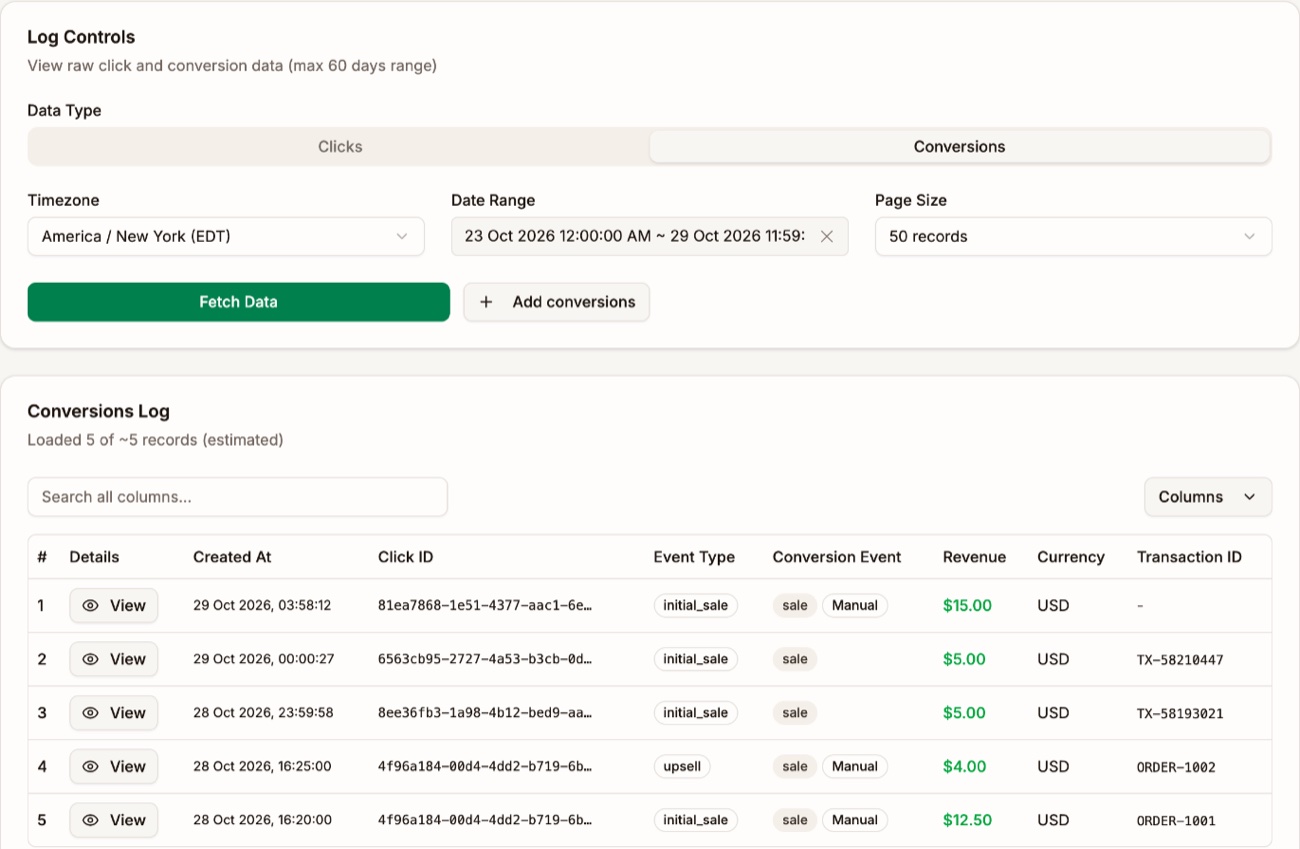
Go to Tracker → Tracker Settings, open Click/Conversion Log, and choose Conversions. Click Add conversions.
Add one conversion
Use One conversion to add a single sale.
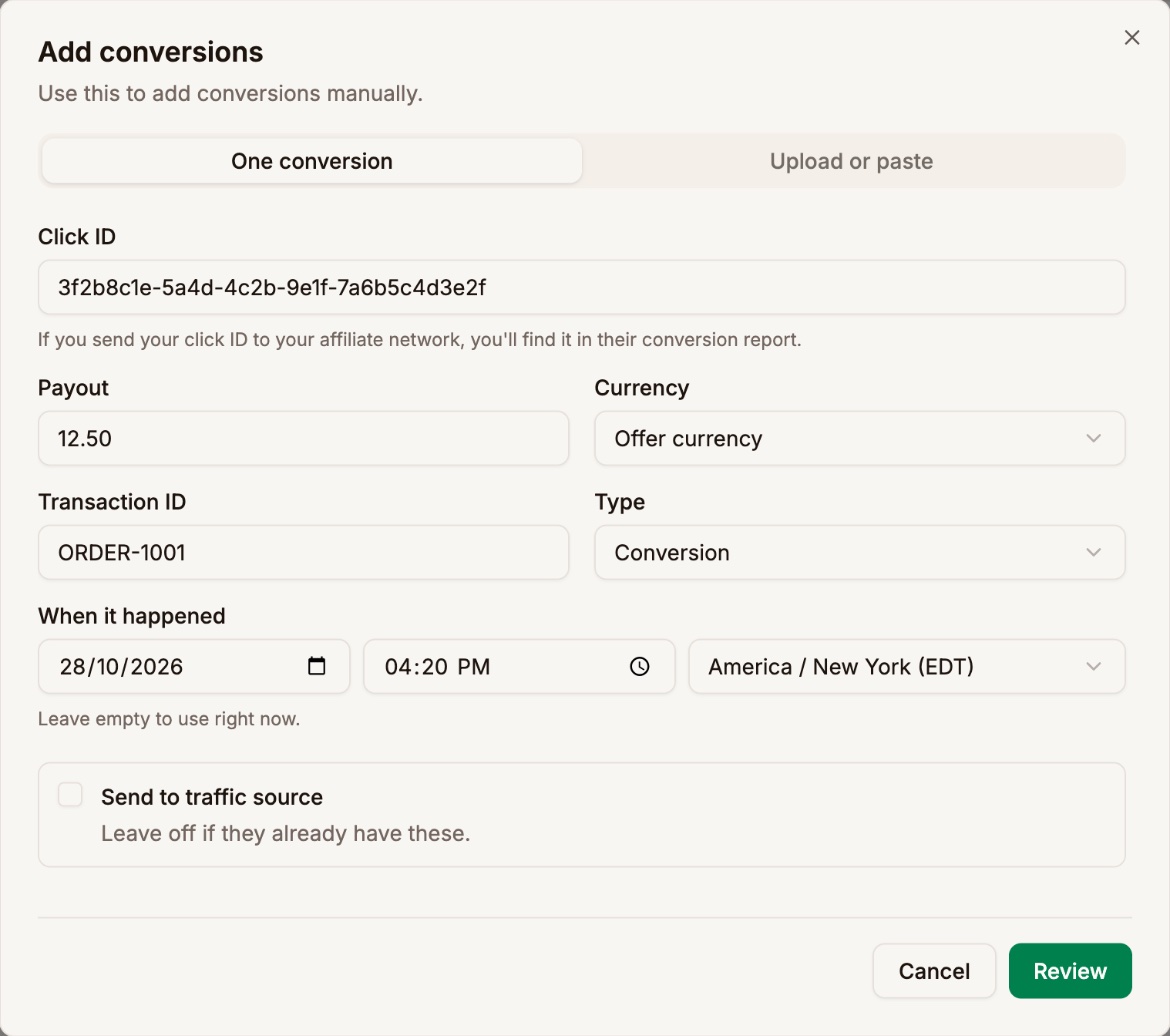
| Field | What to enter |
|---|---|
| Click ID | The Proferex click ID from your offer source's report. Required. |
| Payout | What you earned. Leave it empty to use the offer's Payout. |
| Currency | Offer currency uses the offer's currency. Pick another if the payout is in a different one. |
| Transaction ID | Your offer source's ID for the sale. Fill it in so the conversion can never be added twice. |
| Type | Conversion for the first sale, or Upsell or Rebill for an extra one. See Upsells and Rebills. |
| When it happened | The date, time, and timezone of the sale. Leave it empty to use right now. |
| Send to traffic source | Tick it to pass the conversion on to the visitor's traffic source. Leave it off if the traffic source already has it. |
Click Review to check the conversion before it is added.
Add many from a file or a paste
Use Upload or paste to add up to 100 conversions at once. Click Choose CSV file, or paste rows straight from a spreadsheet. Download template gives you a file with the right columns.
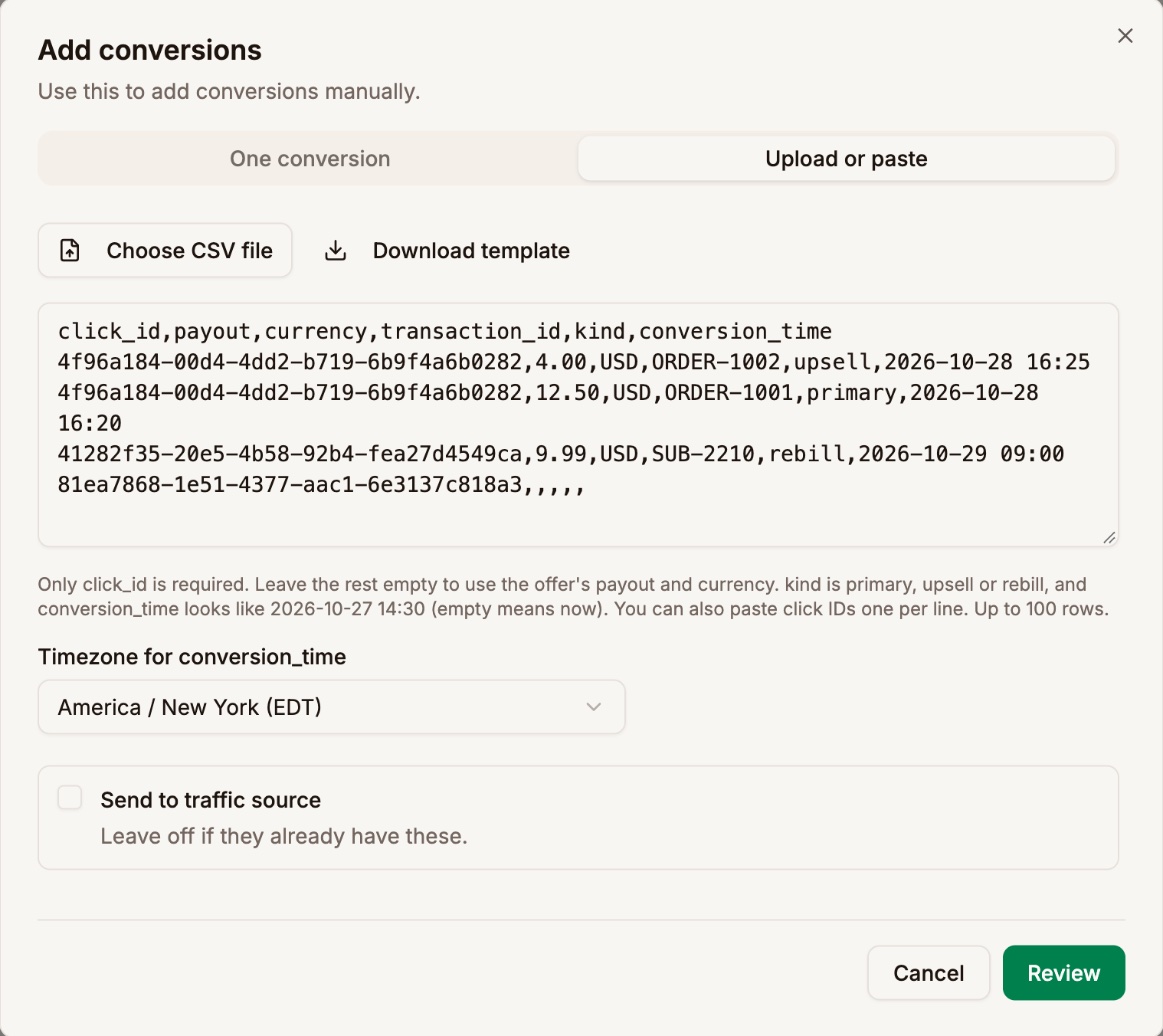
click_id,payout,currency,transaction_id,kind,conversion_time
3f2b8c1e-5a4d-4c2b-9e1f-7a6b5c4d3e2f,12.50,USD,ORDER-1001,primary,2026-10-27 14:30
3f2b8c1e-5a4d-4c2b-9e1f-7a6b5c4d3e2f,4.00,USD,ORDER-1002,upsell,2026-10-27 14:35
9a1c7e2d-4b3f-4e8a-8c1d-2f6e5b4a3c21,,,,,| Column | What it holds | When it's empty |
|---|---|---|
click_id | The Proferex click ID. Required. | The row is refused |
payout | What you earned, such as 12.50 | The offer's payout |
currency | A three-letter code, such as USD | The offer's currency |
transaction_id | Your offer source's ID for the sale | One conversion of each kind per click |
kind | primary, upsell, or rebill | primary |
conversion_time | When the sale happened | Right now |
Only click_id is required. You can also paste a plain list of click IDs, one per line, with no header.
The first row names the columns, in any order. Proferex also understands the names offer sources often use in their exports: subid, sub_id, cid, or click for the click ID; revenue, amount, sum, or value for the payout; tid, txid, order_id, or transactionid for the transaction ID; and time, date, datetime, or timestamp for the time. Commas, semicolons, and tabs all work as separators.
conversion_time
Write the time the way the table shows. Timezone for conversion_time says which timezone those times are in.
| You write | Proferex reads |
|---|---|
2026-10-27 14:30 | 2:30 PM on 27 October, in the timezone you pick |
2026-10-27 14:30:15 | The same, to the second |
2026-10-27 | Midnight at the start of 27 October, in the timezone you pick |
2026-10-27T14:30 | The same as with a space |
2026-10-27 14:30Z | 2:30 PM UTC, whatever timezone you pick |
2026-10-27 14:30-04:00 | 2:30 PM at four hours behind UTC, such as New York in summer |
2026-10-27 14:30+0530 | 2:30 PM at five and a half hours ahead of UTC, such as India |
A time with its own offset, like the last three rows, ignores the timezone you pick. Use that form when your offer source's export includes the offset.
Review before adding
Review checks every row and shows what will happen, before anything is added.
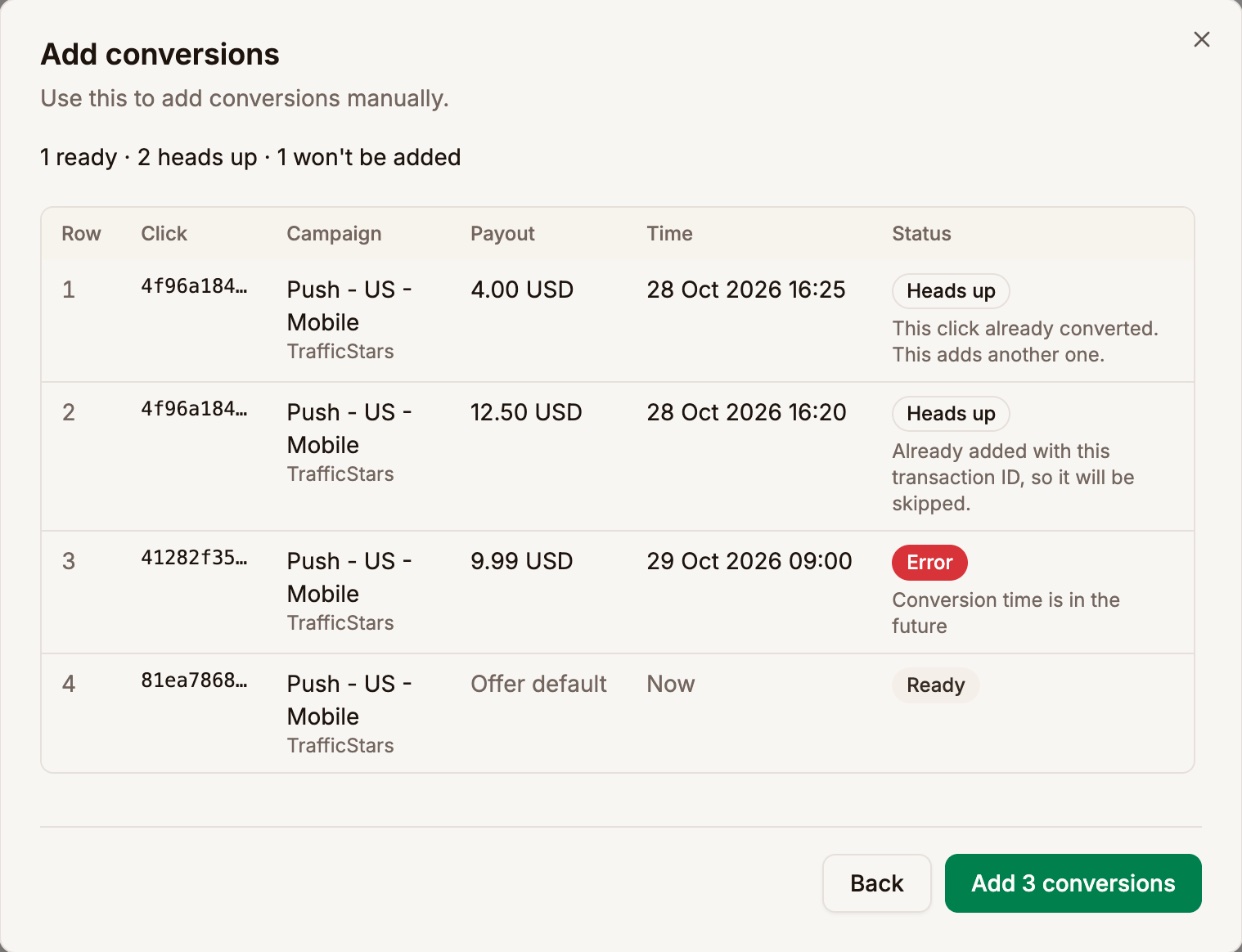
| Status | What it means |
|---|---|
| Ready | The row is added as shown. |
| Heads up | The click already has a conversion. The message says whether this row adds another one or is skipped as a repeat. |
| Error | The row won't be added. The message says why, such as an unknown click ID, a time in the future, or a time before the visit. |
Each row shows the campaign and traffic source of its click, so you can check you have the right one. Click Back to fix the rows, or the Add button, such as Add 3 conversions, to add every row that isn't an error. The last step shows how many were added and which were skipped as already there.
What a manual conversion does
- It counts like a postback. A first conversion counts in Conversions, and its revenue appears on the day you gave it, within a minute. Conversions dated a long time back can take a little longer to show.
- It carries a Manual tag in the Click/Conversion Log, so you can always tell it apart from one your offer source sent.
- It is never counted twice. The same click with the same transaction ID and type is skipped. Without a transaction ID, a click gets one conversion of each type.
- It doesn't use up offer caps. Caps limit live traffic, and these sales already happened.
- It adds a CPA charge on a CPA campaign, on the day of the conversion, the same as a postback. See Costs.
- It stays in Proferex unless you tick Send to traffic source. Ticked, the traffic source's Upsells and rebills setting decides, as it does for a postback. Your piggyback postbacks are not called.
Add conversions with your AI app
Agent Chat and your connected AI app can add conversions for you. Paste rows from your offer source's report and ask, for example: "Add these conversions. The times are in New York time."
The assistant checks the rows first and tells you what will happen. Nothing is added until you confirm. See Agent Chat and Connect Your AI App with MCP.
Next step
Compare last week's conversions in your offer source's report with the Conversions log, and add any that are missing.